Every email address contains a domain, but many people overlook what this part actually means. It determines where your messages are delivered, helps identify your organization, and plays a role in email security.
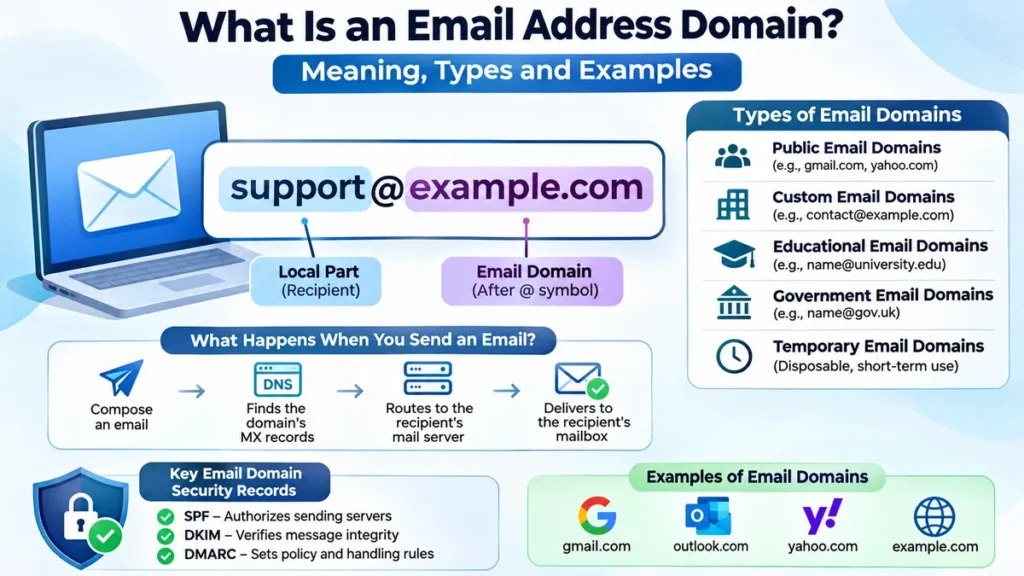
An email address domain is the portion of an email address that appears after the @ symbol. For example, in john@gmail.com, the domain is gmail.com. It identifies the destination for email delivery and helps mail servers route messages to the appropriate email hosting system.
Understanding email domains can help you create professional email addresses, manage business communications, recognize suspicious messages, and troubleshoot common email delivery problems.
What Is an Email Address Domain?
An email domain is a domain name configured to support electronic mail communication. It connects an email address to the infrastructure responsible for processing and delivering messages.
For instance, consider the following email address:
support@example.com
This address contains three basic components:
- Local part: support
- Separator: @
- Email domain: example.com
The local part identifies a mailbox or recipient, while the domain identifies the destination where the message should be delivered. Multiple email addresses can share the same domain while belonging to different users.
Understanding the Structure of an Email Domain
An email domain can contain several components.
| Component | Example | Purpose |
|---|---|---|
| Local part | support | Identifies the recipient |
| @ symbol | @ | Separates the recipient and domain |
| Second-level domain | example | Identifies the domain name |
| Top-level domain | .com | Identifies the domain extension |
| Subdomain | mail.example.com | Creates an additional domain level |
In an address such as support@mail.example.com, the complete email domain is mail.example.com, not simply example.com.
How Do I Find My Email Domain?
Open your email account and locate your complete email address. Everything appearing after the @ symbol is your email domain.
For example:
| Email Address | Email Domain |
|---|---|
| john@gmail.com | gmail.com |
| sarah@yahoo.com | yahoo.com |
| david@outlook.com | outlook.com |
| contact@example.org | example.org |
| support@example.co.uk | example.co.uk |
| admin@mail.example.com | mail.example.com |
Remember that the domain includes the complete extension and any subdomains.
How Does an Email Address Domain Work?
Email domains operate through a combination of domain names, DNS records, mail servers, and communication protocols.
When you send an email, your email service uses the recipient’s domain to determine where the message belongs. The Domain Name System (DNS) provides information that helps locate the receiving mail server.
The email delivery process generally follows these steps:
- You compose an email and enter the recipient’s address.
- Your outgoing mail server identifies the recipient’s domain.
- The server performs a DNS lookup to locate the domain’s Mail Exchange (MX) records.
- The message is transmitted using Simple Mail Transfer Protocol (SMTP).
- The receiving mail server checks the message and applies security filters.
- The message is delivered to the recipient’s mailbox or otherwise processed according to server policies.
The recipient can then access the message through webmail or an email application using protocols such as IMAP or POP3.
What Are MX Records?
Mail Exchange records are DNS records that specify which mail servers handle incoming emails for a domain.
A domain can have multiple MX records with different priority values. Lower numerical values generally indicate a higher delivery preference.
Incorrect or missing DNS configurations can cause email delivery failures, particularly when moving between hosting providers.
Email Domain vs. Email Server
An email domain and an email server perform different functions.
The domain identifies the logical destination of an email, while the mail server handles the technical processes involved in receiving, storing, or transmitting messages.
For example, a company may use example.com as its email domain while Google Workspace or Microsoft 365 provides its email infrastructure.
Different Types of Email Domains
Email domains fall into several categories depending on ownership, intended use, and hosting arrangements.
Public Email Domains
Public email domains are provided by email services that allow individuals to register accounts under a shared domain.
Common examples include:
| Email Provider | Email Domain |
|---|---|
| Gmail | gmail.com |
| Yahoo Mail | yahoo.com |
| Outlook | outlook.com |
| Hotmail | hotmail.com |
| Proton Mail | proton.me |
| iCloud Mail | icloud.com |
| AOL Mail | aol.com |
| Mail.com | mail.com |
Public domains are suitable for personal communication, online registrations, and everyday correspondence. Many providers offer free accounts with optional premium features.
However, users generally cannot control the domain’s DNS configuration or organization-wide email policies.
Custom Email Domains
A custom email domain uses a domain name registered and controlled by an individual or organization.
Examples include:
- contact@example.com
- sales@example.com
- billing@example.com
- support@example.com
Custom domains allow organizations to maintain a consistent identity across departments, employees, and communication channels.
They are commonly used by businesses, freelancers, agencies, and online publishers.
Educational Email Domains
Schools, colleges, and universities often provide institutional email addresses to students, teachers, and administrative staff.
These domains may use extensions such as .edu, .ac.uk, or other country-specific academic domain structures.
Eligibility for educational domain extensions depends on the relevant registry’s requirements.
Government Email Domains
Government organizations frequently use official domain extensions such as .gov, .gov.uk, or .gov.au.
These domains help distinguish official government communications from ordinary commercial correspondence. However, recipients should still verify unexpected requests because display names and sender information can be manipulated.
Temporary and Disposable Email Domains
Disposable email services provide temporary addresses that may expire after a specified period.
People sometimes use them for short-term registrations or to reduce unwanted promotional emails.
However, they are unsuitable for important accounts, banking, business communication, or services requiring long-term account recovery.
Email Domain vs. Email Address vs. Website Domain
Although these terms are closely related, they do not mean the same thing.
An email address identifies a specific recipient. An email domain identifies the destination domain associated with that recipient, while a website address directs visitors to an online resource.
| Feature | Email Address | Email Domain | Website Address |
|---|---|---|---|
| Example | info@example.com | example.com | https://example.com |
| Main purpose | Identifies a recipient | Supports mail routing | Opens a website |
| Contains @ | Yes | No | No |
| Requires email hosting to receive mail | Yes | Yes, for mail service | No |
| Can serve multiple users | Generally one address or destination | Yes | Not applicable |
Can a Website and Email Use the Same Domain?
Yes. A single domain can support both a website and multiple email accounts.
For example, an organization could operate:
- Website:
https://example.com - General inquiries:
info@example.com - Customer support:
support@example.com - Accounts department:
accounts@example.com
Website traffic and email traffic can be directed to separate services through DNS configurations.
This means your website can be hosted with one provider while your email accounts operate through another.
Can You Have an Email Domain Without a Website?
Yes. A functioning website is not required to use a custom email domain.
You only need control of a registered domain and an appropriately configured email service. This arrangement is useful for freelancers, consultants, organizations, and businesses that have not launched their websites.
Custom Email Domains vs. Free Email Domains
Free and custom email domains both support everyday communication, but they differ in flexibility, ownership, and administrative control.
| Feature | Free Email Domain | Custom Email Domain |
|---|---|---|
| Example | business@gmail.com | contact@example.com |
| Domain control | Email provider | Domain registrant |
| Business branding | Limited | Customizable |
| DNS management | Unavailable to ordinary users | Available |
| Departmental addresses | Limited | Flexible |
| Hosting migration | Address generally tied to provider | Possible while retaining domain |
| Cost | Usually free | Domain and hosting costs may apply |
| Administrative control | Provider-dependent | Hosting-plan dependent |
Why Do Businesses Use Custom Email Domains?
A professional email domain helps establish a recognizable business identity. It also provides practical advantages beyond appearance.
Organizations can create separate addresses for departments, manage employee access, establish forwarding rules, and configure domain authentication.
Another significant advantage is portability. If a business changes email hosting providers, it can generally retain its existing addresses by updating the domain’s DNS records and migrating its mailbox data.
Does a Custom Domain Improve Email Deliverability?
A custom domain gives its owner greater control over authentication and sending reputation, but it does not automatically guarantee better inbox placement.
Email deliverability depends on factors such as sender reputation, authentication, complaint rates, recipient engagement, sending volume, and message quality.
A poorly managed custom domain can perform worse than an established public email account.
How to Create a Custom Email Domain
Setting up a custom domain email address involves domain registration, email hosting, DNS configuration, and mailbox creation.
Step 1: Choose a Domain Name
Select a domain name that reflects your business, organization, or personal identity.
A suitable domain should be easy to spell, memorable, and free from unnecessary numbers or confusing characters.
Common domain extensions include:
| Extension | Common Use |
|---|---|
| .com | General and commercial purposes |
| .org | Organizations and nonprofits |
| .net | General and technology-related purposes |
| .co | Businesses and startups |
| .uk | United Kingdom |
| .ca | Canada |
| .au | Australia |
| .de | Germany |
A domain registrar manages the registration and renewal of the domain name.
Step 2: Select an Email Hosting Provider
Email hosting provides the infrastructure required to send, receive, and store messages.
Common email hosting services include Google Workspace, Microsoft 365, Zoho Mail, Proton Mail, and Namecheap Private Email.
When evaluating email hosting, consider mailbox storage, authentication support, account recovery, spam protection, administrative controls, and backup options.
Step 3: Configure DNS Records
Your hosting provider will supply the DNS records required to connect your domain to its email service.
| DNS Record | Function |
|---|---|
| MX | Directs incoming email |
| SPF | Identifies authorized sending servers |
| DKIM | Supports message signature verification |
| DMARC | Defines authentication policies and reporting |
| TXT | Stores verification and authentication information |
| CNAME | Supports provider-specific configuration |
DNS changes may take time to become visible across different networks. Always use the exact record values provided by your email hosting service.
Step 4: Create Your Email Addresses
After connecting the domain, create mailboxes according to your communication requirements.
For example, a small organization may use the following structure:
| Email Address | Purpose |
|---|---|
| info@example.com | General inquiries |
| support@example.com | Customer support |
| sales@example.com | Sales inquiries |
| billing@example.com | Invoices and payments |
| admin@example.com | Administrative tasks |
| careers@example.com | Recruitment |
| contact@example.com | External communication |
Some addresses can be configured as aliases rather than separate paid mailboxes.
Step 5: Test Your Email Configuration
Send test messages to external email providers and confirm that you can receive replies.
Check authentication results, spam folder placement, attachments, and delivery notifications.
Testing both incoming and outgoing messages helps identify configuration problems before the domain is used for important communication.
Email Domain Authentication, Security and Common Problems
Email domains are frequently targeted by phishing, spoofing, and other forms of online fraud. Proper authentication helps receiving mail servers evaluate whether a message is authorized.
SPF (Sender Policy Framework)
SPF allows domain owners to publish information about which mail servers are authorized to send messages using the domain in relevant SMTP sender identities.
An incorrect SPF record may cause authentication failures for legitimate messages.
DKIM (DomainKeys Identified Mail)
DKIM attaches a cryptographic signature to outgoing emails.
Receiving mail servers can use the public key published in DNS to verify the signature and determine whether signed portions of the message have been modified.
DMARC (Domain-based Message Authentication, Reporting and Conformance)
DMARC builds on SPF and DKIM by checking whether authenticated domains align with the domain visible in the message’s From address.
It also allows domain owners to publish policies requesting how receiving servers should handle messages that fail DMARC checks.
The three standard policy options are:
| DMARC Policy | Purpose |
|---|---|
| None | Monitor authentication results |
| Quarantine | Request suspicious handling of failed messages |
| Reject | Request rejection of failed messages |
Domain owners should verify legitimate sending sources before implementing restrictive DMARC policies.
How to Check Whether an Email Domain Is Valid
A valid-looking email address does not necessarily represent a working mailbox.
Several checks can help assess a domain:
- Confirm that the domain name is spelled correctly.
- Check whether the domain exists in DNS.
- Examine its MX records and other relevant mail-routing records.
- Review available domain registration information.
- Inspect email authentication results.
- Check for suspicious spelling variations or impersonation attempts.
Tools such as MXToolbox, Google Admin Toolbox Dig, and standard DNS lookup utilities can assist with technical checks.
However, successful domain validation does not prove that a specific mailbox exists or that its owner is trustworthy.
What Is Email Domain Spoofing?
Email spoofing occurs when someone manipulates sender information to make a message appear to originate from another person or organization.
Attackers may also register lookalike domains containing subtle spelling differences.
For example:
| Expected Domain | Suspicious Lookalike |
|---|---|
| example.com | examp1e.com |
| example.com | exarnple.com |
| example.com | example-support.net |
Always examine the complete sender address rather than relying on the displayed sender name.
Avoid opening unexpected attachments or entering passwords through unfamiliar links. Multi-factor authentication (MFA) can also help protect email accounts against unauthorized access.
Common Email Domain Problems and Solutions
| Problem | Possible Cause | Solution |
|---|---|---|
| Emails are not received | Incorrect MX records | Verify mail-routing configuration |
| Emails land in spam | Authentication or reputation issues | Review SPF, DKIM, DMARC and sending practices |
| Domain cannot be verified | Missing verification record | Check DNS record values |
| Email address stops working | Expired domain or hosting plan | Check registration and hosting status |
| Messages bounce back | Invalid mailbox or server rejection | Review the bounce notification |
| Authentication fails | Incorrect or missing DNS records | Follow hosting provider instructions |
| Emails are delayed | Server congestion or temporary errors | Review mail queues and server status |
Domain reputation develops over time. Consistent, permission-based sending practices, low complaint rates, accurate mailing lists, and correct authentication help maintain a healthier email environment.
Conclusion
An email address domain is the part of an email address that follows the @ symbol. It plays an essential role in mail routing, digital identity, professional communication, and email authentication.
Public email domains offer convenience for everyday communication, while custom domains provide greater control over branding, mailbox management, security configurations, and hosting portability.
Whether you use Gmail for personal correspondence or a registered domain for business communication, understanding DNS, MX records, SPF, DKIM, and DMARC can help you manage email more effectively and recognize potential security risks.
The most suitable email domain is one that meets your communication requirements, remains properly configured, and supports reliable, secure access over time.