A website can have a valid SSL certificate and still display a security warning. One common reason is a broken or incomplete certificate chain.
When you visit an HTTPS website, your browser needs more than a certificate claiming the website is secure. It needs a reliable way to verify who issued that certificate and whether the issuer can be trusted.
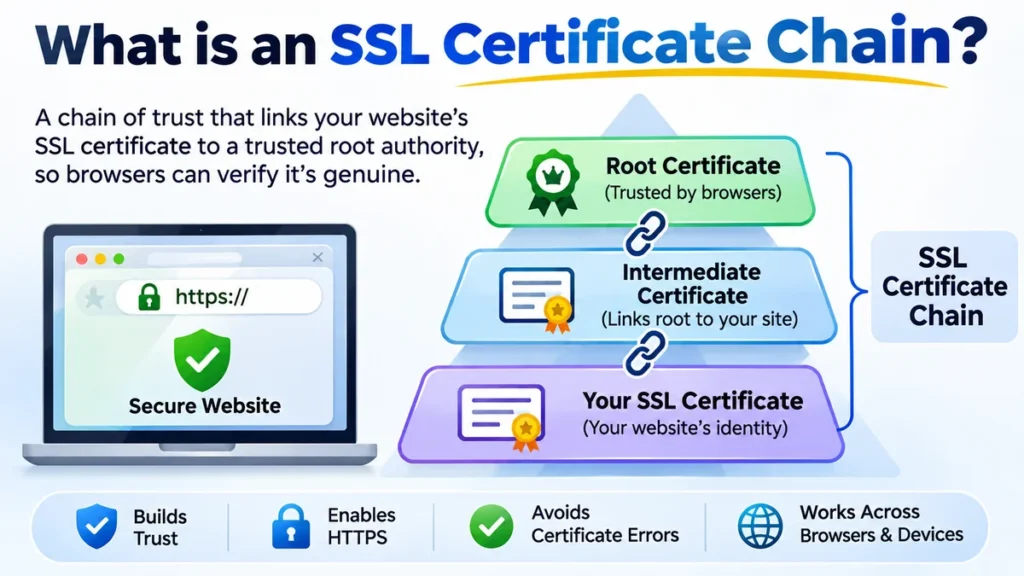
An SSL certificate chain is a sequence of digital certificates that connects a website’s SSL/TLS certificate to a trusted root Certificate Authority (CA). It typically includes a server certificate, one or more intermediate certificates, and a trusted root. This chain allows browsers to verify a website’s identity and establish an authenticated HTTPS connection.
Understanding certificate chains helps explain why HTTPS works, how browsers establish trust, and what causes errors such as “unable to verify the first certificate” or “certificate chain incomplete.”
What Is an SSL Certificate Chain and Why Is It Important?
An SSL certificate chain, also called a TLS certificate chain or chain of trust, establishes a verifiable relationship between a website’s digital certificate and a trusted Certificate Authority.
SSL stands for Secure Sockets Layer, while TLS stands for Transport Layer Security. Although SSL is an outdated protocol, the term SSL certificate remains widely used to describe certificates used with modern TLS connections.
A certificate chain is part of the Public Key Infrastructure (PKI), the framework used to issue, manage, and validate digital certificates.
Why does a website need a certificate chain?
Imagine visiting https://www.example.com.
The website presents a certificate identifying the domain, but the browser cannot simply accept that claim. Anyone could generate a certificate containing the same domain name.
Instead, the browser checks whether a trusted authority has signed the certificate, directly or through another authorized authority.
The certificate chain provides the evidence needed for that verification.
A properly validated chain helps:
- Authenticate the website: Establishes that a trusted CA issued a certificate for the requested domain.
- Prevent impersonation: Makes it harder for attackers to present fraudulent certificates that browsers will accept.
- Support secure HTTPS connections: Allows certificate authentication during the TLS handshake.
- Maintain browser compatibility: Helps browsers, mobile applications, and API clients recognize the certificate.
- Avoid certificate warnings: Reduces failures caused by missing or untrusted issuers.
Certificate validation does not encrypt website traffic by itself. Encryption is negotiated separately during the TLS handshake.
The certificate helps authenticate the server’s participation in that process.
The Three Main Components of an SSL Certificate Chain
A conventional publicly trusted certificate chain contains three certificate roles: leaf, intermediate, and root.
SSL certificate chain structure
Root CA Certificate
Trusted by the browser or operating system
Signs and authorizes
Intermediate CA Certificate
Links the website certificate to the root
Signs and authorizes
Leaf / Server Certificate
Issued for www.example.com
This is the typical certificate hierarchy. Some chains contain multiple intermediate certificates, while private PKI environments may use different structures.
1. Root Certificate Authority Certificate
The root CA certificate is the trust anchor of a certificate hierarchy.
A root certificate is usually self-signed, meaning its digital signature is created using the corresponding root private key.
However, self-signing does not automatically make a certificate trustworthy.
Trust comes from the root certificate being explicitly included in a trusted certificate store maintained by a browser, operating system, or organization.
Common certificate authorities and trust providers include:
- DigiCert
- Sectigo
- Let’s Encrypt
- Google Trust Services
- GlobalSign
For example, Let’s Encrypt operates the ISRG Root X1 trust anchor.
Operating systems such as Windows, macOS, Android, and Linux distributions use certificate trust stores, although the contents and management mechanisms differ.
Browsers including Google Chrome, Mozilla Firefox, Microsoft Edge, and Safari rely on their applicable trust programs and certificate stores.
Root CA private keys receive particularly strong protection because compromising one could undermine trust in certificates issued beneath it.
2. Intermediate Certificate Authority Certificate
An intermediate CA certificate connects the website’s certificate to a trusted root.
Rather than using root private keys to sign every website certificate, certificate authorities generally delegate issuance to intermediate CAs.
For example:
Root CA → Intermediate CA → Website Certificate
The intermediate CA signs the website’s certificate. Its own certificate is signed by the root or another intermediate CA.
This separation has practical security benefits.
If an intermediate CA is compromised, its authority can be revoked or distrusted without necessarily replacing the entire root infrastructure.
Intermediate certificates also allow CAs to separate certificate issuance by purpose, technology, or operational requirements.
A website may require more than one intermediate certificate to complete its certification path.
A missing intermediate certificate is one of the most common causes of an incomplete SSL certificate chain. knowledge.digicert.com+1
3. Leaf Certificate or Server Certificate
The leaf certificate, also called the end-entity certificate, is issued to the website or service being authenticated.
For example, a certificate might cover:
www.example.com
Its Subject Alternative Name (SAN) extension identifies the domain names or other supported identities for which the certificate is valid.
A leaf certificate typically contains:
- The certificate subject and issuer
- The public key
- The certificate serial number
- Validity dates
- The digital signature algorithm
- Subject Alternative Names
- Key Usage and Extended Key Usage extensions
- Information identifying the issuing CA
The website’s server uses the private key corresponding to the certificate’s public key during TLS authentication.
That private key must remain confidential and should never be included in a publicly distributed certificate chain file.
Root vs. intermediate vs. leaf certificates
| Feature | Root certificate | Intermediate certificate | Leaf certificate |
|---|---|---|---|
| Main purpose | Establish trust | Delegate trust | Identify a website |
| Signed by | Usually itself | Root or another intermediate | Issuing CA |
| CA capability | Yes | Yes | Normally no |
| Installed on server | Usually not sent | Normally sent | Required |
| Stored in trust store | Commonly | Sometimes | Not normally |
| Typical role | Trust anchor | Issuer | End entity |
The root, intermediate, and leaf certificates work together, but they have different responsibilities.
How Does an SSL Certificate Chain Work?
An SSL certificate chain works by allowing a browser to validate digital signatures and trace the website’s certificate back to a trusted authority.
The process occurs during the TLS handshake, before the browser treats the connection as authenticated.
Step 1: The browser connects to an HTTPS website
Suppose a user visits:
The browser establishes a network connection and begins a TLS handshake.
The client and server negotiate supported protocol versions, cryptographic algorithms, and other connection parameters.
Step 2: The server sends its certificate chain
The server sends its leaf certificate and normally includes the intermediate CA certificates required to build a trusted path.
The typical order is:
- Website certificate
- Issuing intermediate certificate
- Higher-level intermediate certificates, if applicable
The root certificate is normally omitted because the client must already trust the root independently.
TLS 1.3 specifies that the sender’s certificate appears first and that subsequent certificates should certify the preceding certificate. IETF Datatracker+1
Step 3: The browser identifies the issuer
The browser examines the leaf certificate’s issuer information and looks for a certificate capable of verifying its signature.
It may use identifiers such as:
- Issuer Distinguished Name
- Authority Key Identifier (AKI)
- Subject Key Identifier (SKI)
The browser then attempts to construct a certification path through the available intermediate certificates.
Some clients can retrieve missing intermediates through an Authority Information Access (AIA) URL, but this behavior is not universal.
A server should therefore provide the necessary intermediate certificates instead of relying on clients to find them.
Step 4: The browser verifies the chain
The browser checks that each certificate was signed by an authorized issuer.
For example:
- The intermediate CA’s public key verifies the leaf certificate’s signature.
- The higher-level CA’s public key verifies the intermediate certificate’s signature.
- The chain ultimately connects to a trusted root.
The browser also checks certificate validity dates, allowed purposes, CA constraints, and applicable certificate policies.
A certificate with an expired validity period or an unauthorized issuer cannot be accepted simply because the rest of the chain looks correct.
Step 5: The browser validates the domain name
A valid chain alone does not prove that the certificate belongs to the website being visited.
The browser must also confirm that the requested hostname matches an identity in the leaf certificate, generally its Subject Alternative Name extension.
A certificate for example.org should not authenticate example.com unless the relevant identity is explicitly covered.
Step 6: The TLS connection is authenticated
After the relevant certificate and handshake checks succeed, the browser can establish an authenticated, encrypted connection.
Modern TLS uses cryptographic key exchange to establish traffic secrets and symmetric encryption to protect application data.
The certificate chain supports authentication, while the negotiated TLS cryptography protects data confidentiality and integrity.
The formal X.509 certification path validation model is defined in RFC 5280. RFC Editor+1
What Is an SSL Certificate Chain of Trust?
The chain of trust is the relationship that allows a browser to rely on a website certificate without having previously encountered that specific website.
Instead of individually trusting millions of website certificates, a browser maintains a smaller collection of trusted certificate authorities.
Those authorities can authorize intermediate CAs, which issue certificates to websites.
This is called hierarchical trust.
How digital signatures establish trust
A digital signature binds certificate information to an issuer’s cryptographic key.
When a CA signs a certificate, the signature allows a client to verify that the certificate data has not been altered since issuance by the holder of that signing key.
A client uses the issuer’s public key to verify the signature.
However, cryptographic signature verification is only one part of certificate validation.
The client must also determine whether that issuer was authorized to issue the certificate.
For example, an intermediate CA normally needs:
- A Basic Constraints extension identifying it as a CA
- An appropriate Key Usage extension allowing certificate signing
- Compliance with applicable path length constraints
- A valid certification path to an accepted trust anchor
Name Constraints and certificate policy restrictions may also affect whether a path is valid.
Why self-signed certificates generate warnings
A self-signed certificate is not necessarily malicious.
Organizations frequently use self-signed root certificates for internal systems, development environments, and private networks.
The problem occurs when a browser encounters a self-signed certificate that is not trusted.
Without an established trust anchor, the browser cannot authenticate the claimed identity through the public PKI system.
This can produce errors such as:
NET::ERR_CERT_AUTHORITY_INVALID
An organization can explicitly configure its managed devices to trust a private root CA.
However, installing unknown root certificates on personal devices can create serious security risks because those certificates may grant broad authentication authority.
Does a longer certificate chain provide better security?
Not necessarily.
A longer chain does not automatically mean stronger encryption or greater trust.
Each additional intermediate certificate introduces another certificate that must be validated and potentially another operational dependency.
Longer chains can also increase handshake data size.
A shorter, correctly configured chain is often preferable when it satisfies the necessary trust and compatibility requirements.
What Is an SSL Certificate Chain File?
An SSL certificate chain file contains certificates used to establish the issuing path for a server certificate.
Depending on the certificate authority, hosting provider, and web server, these certificates may be supplied as separate files or combined into one file.
Common file names include:
cert.pemchain.pemfullchain.pemca-bundle.crtcertificate.crt
The names are conventions, not universal standards. The actual contents matter more than the extension.
Certificate file vs. chain file vs. fullchain file
| File | Typical contents | Purpose |
|---|---|---|
cert.pem | Leaf certificate | Identifies the website |
chain.pem | Intermediate CA certificates | Supplies the issuing path |
fullchain.pem | Leaf followed by intermediates | Provides the server’s certificate chain |
privkey.pem | Private key | Proves control of the certificate’s key |
ca-bundle.crt | CA certificates | Provides issuer certificates or trust material, depending on context |
The fullchain.pem convention is especially common in Let’s Encrypt and Certbot configurations.
A PEM certificate is Base64-encoded data enclosed by certificate boundary markers.
For example:
-----BEGIN CERTIFICATE-----
Base64-encoded certificate data
-----END CERTIFICATE-----
Multiple PEM certificates can be concatenated into a single file.
By contrast, DER is a binary encoding format commonly used for X.509 certificates.
PKCS#7 files, often using .p7b or .p7c, can package certificates and certificate chains.
PKCS#12 files, commonly using .p12 or .pfx, can package certificates together with private keys and other related material.
Should the root certificate be included in the full chain?
Usually not.
Public web servers normally send the leaf certificate followed by the required intermediate certificates.
The client establishes trust using its own root store.
Sending a root certificate does not make the client trust it, and including it generally adds unnecessary handshake data.
Some specialized systems and private PKI configurations use different packaging requirements, so the intended software’s documentation should take precedence.
How to Check an SSL Certificate Chain
You can inspect an SSL certificate chain using a browser, an online SSL checker, or a command-line utility such as OpenSSL.
Each method provides a different level of detail.
Method 1: Check the certificate chain in a browser
Modern browsers provide certificate inspection tools.
In Google Chrome, for example:
- Open the HTTPS website.
- Click the site information icon near the address bar.
- Open the connection security information.
- Select the certificate information option.
- Inspect the certificate details and available certification path.
The exact interface varies by browser version and operating system.
Look for the certificate subject, issuer, validity dates, and certificate hierarchy.
If the website uses a publicly trusted certificate, the browser should be able to construct a valid path to a trusted authority.
However, a browser accepting a certificate does not necessarily mean the server transmitted every required intermediate.
Some browsers cache intermediate certificates or retrieve them separately.
Method 2: Check the chain using OpenSSL
OpenSSL is a widely used cryptographic toolkit available on Linux, macOS, and Windows.
To inspect the certificates presented by a server, run:
openssl s_client \
  -connect example.com:443 \
  -servername example.com \
  -showcerts
Replace example.com with the domain you want to test.
The command displays the server’s certificate information, including the certificates supplied during the handshake.
The -servername parameter sends Server Name Indication (SNI), which is essential when multiple HTTPS websites share an IP address.
The -showcerts option displays the certificates transmitted by the server.
Look for output resembling:
Certificate chain
 0 s:CN=example.com
   i:CN=Example Intermediate CA

 1 s:CN=Example Intermediate CA
   i:CN=Example Root CA
This illustrative output indicates that the server supplied a leaf certificate and an intermediate certificate.
A successful verification may report:
Verify return code: 0 (ok)This result means OpenSSL successfully verified the chain under the trust configuration and verification parameters used for that command. It does not, by itself, establish that hostname verification was performed.
For a more explicit HTTPS verification, use:
openssl s_client \
  -connect example.com:443 \
  -servername example.com \
  -verify_hostname example.com \
  -verify_return_error \
  -showcerts
This command also requests hostname verification and terminates verification when a certificate validation error occurs.
Method 3: Inspect an individual certificate
To inspect a certificate saved locally, run:
openssl x509 \
  -in certificate.pem \
  -text \
  -noout
The output includes the certificate’s issuer, subject, validity period, public key details, and X.509 extensions.
To display only the issuer and subject:
openssl x509 \
  -in certificate.pem \
  -noout \
  -issuer \
  -subject
These fields help identify the certificate’s place in the chain.
For an intermediate certificate, inspect the Basic Constraints extension to confirm that it is authorized to act as a CA.
Method 4: Use an online SSL certificate checker
Online testing services provide a convenient way to examine publicly accessible HTTPS servers.
Common tools include:
- Qualys SSL Labs Server Test
- DigiCert SSL Installation Diagnostics
- crt.sh Certificate Transparency Search
SSL Labs can examine the server’s certificate chain, protocol configuration, and supported cryptographic settings.
DigiCert’s diagnostic tool can help identify certificate installation problems.
The crt.sh service searches Certificate Transparency records. It is useful for investigating certificate issuance but is not a replacement for checking the chain currently served by a website.
Quick takeaway: For troubleshooting, inspect the chain transmitted by the server rather than relying exclusively on what one browser displays.
Common SSL Certificate Chain Errors and How to Fix Them
SSL certificate chain errors occur when a client cannot construct or accept a valid certification path.
The problem may involve a missing certificate, an untrusted root, an expired intermediate, an incorrect hostname, or an incompatible trust configuration.
1. Unable to verify the first certificate
This error commonly appears in OpenSSL-based applications and Node.js environments.
It generally means the client cannot build a valid trusted path from the server’s certificate.
Possible causes include:
- Missing intermediate certificates
- An untrusted issuing CA
- An incorrectly configured certificate bundle
- An outdated trust store
- A private CA certificate that has not been trusted
How to fix it: Inspect the presented certificates, identify the missing or incorrect issuer, and configure the server to transmit the proper intermediate chain.
If the certificate was issued by a private CA, the client must be configured to trust the appropriate private root through a secure administrative process.
2. Incomplete certificate chain
An incomplete certificate chain usually means the server has omitted an intermediate certificate needed for path construction.
For example, the server might send only:
Leaf CertificateInstead of:
Leaf Certificate
Intermediate Certificate
Some browsers may still connect successfully because they already possess the missing intermediate.
Other clients, including API clients, command-line utilities, and embedded systems, may fail.
How to fix it: Obtain the correct intermediate certificates from the issuing CA and configure the web server to present them.
Do not rely on clients downloading missing certificates automatically.
3. Self-signed certificate in certificate chain
OpenSSL may report:
self-signed certificate in certificate chainThis can occur when a certification path reaches a self-signed certificate that the client does not recognize as a trusted anchor.
A self-signed root is normal in a public PKI hierarchy. The issue is whether the client independently trusts that root.
How to fix it: Confirm that the intended trust anchor is legitimate and trusted by the client.
For public websites, use a chain leading to a root trusted by the relevant browsers and operating systems.
For private systems, distribute the organization’s root certificate through controlled trust-store management.
Avoid disabling certificate verification to bypass the error.
4. Certificate has expired
A certificate may fail validation if its validity period has ended.
The expired certificate could be the leaf certificate or an intermediate CA certificate.
Common error messages include:
certificate has expiredor:
NET::ERR_CERT_DATE_INVALIDIncorrect system clocks can also cause validity checks to fail.
How to fix it: Identify which certificate is outside its validity period, renew or replace the appropriate certificate, and ensure the server presents the correct chain.
Also verify that the client and server clocks are accurate.
5. Unable to get local issuer certificate
This OpenSSL error indicates that the verifier could not locate an issuer certificate needed to complete the path.
It may result from a missing intermediate, an unavailable trust anchor, or a client trust-store configuration issue.
How to fix it: Check both the certificates supplied by the server and the client’s trusted CA configuration.
Adding random CA certificates to a trust store is not a safe solution. Only approved trust anchors should be trusted.
6. Certificate hostname mismatch
A hostname mismatch is not strictly a chain-construction problem, but it is another common reason HTTPS validation fails.
For example, a certificate issued only for example.com may not cover www.example.com.
The certificate could have a perfectly valid chain while still being unsuitable for the requested hostname.
How to fix it: Ensure the certificate’s Subject Alternative Name extension includes the requested domain.
SSL certificate errors at a glance
| Error | Likely cause | Recommended action |
|---|---|---|
| Incomplete chain | Missing intermediate | Install correct CA bundle |
| Unable to verify first certificate | No valid trusted path | Inspect issuer chain and trust store |
| Self-signed certificate error | Untrusted root | Verify and configure trust anchor |
| Certificate expired | Invalid validity period | Renew or replace certificate |
| Local issuer unavailable | Missing issuer or trust configuration | Check server chain and client CA store |
| Hostname mismatch | Incorrect domain identity | Use a certificate covering the hostname |
| Certificate revoked | CA has invalidated certificate | Replace certificate and investigate cause |
Certificate warnings should be investigated rather than bypassed. Disabling verification removes an essential protection against server impersonation.
How to Install an SSL Certificate Chain Correctly
Installing an SSL certificate chain requires configuring the server to present the leaf certificate and the appropriate intermediate certificates.
The exact process depends on the web server, hosting control panel, or cloud platform.
Installing a certificate chain on Nginx
Nginx commonly uses a combined PEM file containing the leaf certificate followed by intermediate certificates.
A basic configuration looks like:
server {
    listen 443 ssl;
    server_name example.com;

    ssl_certificate /etc/ssl/fullchain.pem;
    ssl_certificate_key /etc/ssl/privkey.pem;
}
The fullchain.pem file should contain the certificates in the proper sequence.
The private key remains in a separate protected file.
After updating the configuration, test it:
sudo nginx -tIf the configuration test succeeds, reload Nginx:
sudo systemctl reload nginxNginx’s official documentation confirms that the server certificate should appear before the intermediate certificates in a combined file. Nginx+1
Installing a certificate chain on Apache
Modern Apache HTTP Server versions can load the server certificate and intermediate certificates from the file referenced by SSLCertificateFile.
For example:
<VirtualHost *:443>
    ServerName example.com

    SSLEngine on

    SSLCertificateFile /etc/ssl/fullchain.pem
    SSLCertificateKeyFile /etc/ssl/privkey.pem
</VirtualHost>
Apache 2.4.8 and later support intermediate CA certificates in the SSLCertificateFile file, making the older SSLCertificateChainFile directive unnecessary for typical modern configurations. Apache HTTP Server Version 2.4
After changing the configuration, run:
sudo apachectl configtestThen reload Apache using the service name appropriate for the operating system.
Installing a certificate chain in cPanel
Many shared hosting environments provide an SSL/TLS interface for certificate management.
A typical manual installation process involves:
- Opening the hosting control panel’s SSL/TLS section.
- Selecting the domain.
- Providing the website’s certificate.
- Providing the matching private key.
- Adding the intermediate CA bundle if required.
- Installing the certificate and checking the resulting HTTPS connection.
Some hosting platforms automatically retrieve and configure intermediate certificates.
Others require a CA bundle to be supplied manually.
Certificate chains with Cloudflare
Cloudflare introduces an additional consideration because a proxied website can involve two separate TLS connections:
- Visitor to Cloudflare
- Cloudflare to the origin server
The visitor-facing connection uses a certificate presented by Cloudflare.
The origin connection uses a certificate presented by the origin server.
These certificates may have different issuers and different chains.
Cloudflare supports publicly trusted certificates issued through authorities such as Let’s Encrypt, Google Trust Services, and SSL.com. Cloudflare SSL/TLS docs+1
Cloudflare Origin CA certificates are designed for connections between Cloudflare and origin servers. They are not generally trusted directly by ordinary browsers.
If Cloudflare proxying is disabled and visitors connect directly to an origin using an Origin CA certificate, they may encounter trust warnings.
For a proxied website, a browser test normally examines Cloudflare’s edge certificate rather than the origin’s certificate.
Both connections should be checked separately when troubleshooting HTTPS problems.
Advanced SSL Certificate Chain Concepts
Several additional technologies influence how certificate chains are built, validated, and trusted.
Cross-signed certificates and alternate trust paths
Cross-signing allows one CA certificate or public key to be certified by another CA.
This can create alternative certification paths to different trusted roots.
For example, a certificate hierarchy may support:
Website → Intermediate → Root Aand:
Website → Intermediate → Cross-sign → Root BThe actual certificates and signatures must support each path.
Cross-signing can improve compatibility with devices that trust one root but not another.
However, alternative paths must be managed carefully because expired or distrusted certificates can cause compatibility problems.
Let’s Encrypt provides a real-world example.
As of November 2026, its active intermediate certificates include YE1, YE2, YR1, and YR2. Its published chains can connect through ISRG Root X1, ISRG Root X2, or newer root hierarchies, depending on the selected path and compatibility requirements. Let’s Encrypt
This illustrates why a certificate’s issuer name alone does not always reveal the complete trust path a client will use.
Certificate revocation: CRL and OCSP
A certificate can become untrustworthy before its scheduled expiration date.
For example, its private key might be compromised.
Certificate authorities can revoke certificates to indicate that they should no longer be accepted.
Two important revocation technologies are:
Certificate Revocation List (CRL): A CA-published list identifying revoked certificates.
Online Certificate Status Protocol (OCSP): A protocol for requesting certificate status information from an authorized responder.
Some TLS implementations also support OCSP stapling, where the server provides a previously obtained OCSP response during the handshake.
Revocation enforcement varies across clients and certificate ecosystems. A valid signature and an unexpired certificate do not necessarily establish that a certificate remains acceptable.
Certificate Transparency and SCTs
Certificate Transparency (CT) provides public, auditable records of certificate issuance.
Publicly trusted TLS certificates are subject to applicable browser and CA transparency requirements.
Signed Certificate Timestamps (SCTs) provide evidence that a certificate has been submitted to a qualifying CT log.
CT does not replace certificate chain validation.
Instead, it adds accountability by making certificate issuance more observable.
This can help domain owners and security researchers discover unexpected or unauthorized certificates.
RSA vs. ECDSA certificate chains
SSL/TLS certificates may use different public-key algorithms, including RSA and Elliptic Curve Digital Signature Algorithm (ECDSA).
Both can support secure certificate authentication when correctly configured.
Their characteristics differ:
| Characteristic | RSA | ECDSA |
|---|---|---|
| Cryptographic approach | Integer factorization | Elliptic-curve cryptography |
| Typical key size | Larger | Smaller at comparable security levels |
| Signature size | Generally larger | Generally smaller |
| Compatibility | Broad | Broad on modern clients |
| Chain validation | X.509 path validation | X.509 path validation |
A server can sometimes provide both RSA and ECDSA certificate configurations, allowing compatible clients to use an appropriate certificate.
The cryptographic algorithms used in certificate signatures should not be confused with the symmetric encryption algorithms protecting HTTPS traffic.
X.509 extensions and certificate policies
X.509 certificates include extensions that define how they may be used.
Important extensions include:
- Basic Constraints: Identifies whether a certificate may act as a CA.
- Key Usage: Restricts permitted cryptographic operations.
- Extended Key Usage: Identifies purposes such as TLS server authentication.
- Subject Alternative Name: Identifies supported hostnames and other identities.
- Authority Information Access: May identify issuer certificate locations and OCSP responders.
- CRL Distribution Points: Identifies locations where revocation lists may be retrieved.
- Name Constraints: Restricts the identities subordinate CAs may certify.
Certificate path validation must respect applicable extensions and policies.
For example, a certificate that lacks authorization to sign other certificates cannot simply be treated as an intermediate CA because its public key verifies a signature.
These controls help prevent misuse of certificates within the PKI hierarchy.
Best Practices for Maintaining a Valid SSL Certificate Chain
Certificate chains require ongoing maintenance because certificates expire, CA hierarchies change, and client trust stores evolve.
A reliable HTTPS configuration should follow several principles.
Keep the chain complete
Configure the server to provide the leaf certificate and all intermediate certificates needed for the intended trust path.
Do not depend on browser caching or automatic intermediate retrieval.
Use the correct certificate order
When the server expects a combined PEM file, place the leaf certificate first, followed by the intermediate certificates in issuing order.
An incorrectly ordered bundle can cause configuration errors or prevent the server from loading the intended certificate.
Automate certificate renewal
Automated Certificate Management Environment (ACME) clients, including Certbot, can simplify certificate issuance and renewal.
Renewal automation should update the deployed certificate chain and reload or restart the relevant service when necessary.
A certificate renewed successfully on disk does not help if the web server continues presenting an older certificate.
Monitor intermediate and root changes
Certificate authorities periodically rotate intermediates and introduce new trust paths.
Monitor the issuing CA’s documentation and verify compatibility when changing chains.
Older devices may have different trust stores from current browsers.
Protect private keys
Keep certificate private keys separate from public certificate bundles whenever practical.
Use appropriate filesystem permissions, access controls, and secure key storage.
Never publish private keys in source repositories, support tickets, or publicly accessible directories.
Test after configuration changes
Run certificate checks after:
- Installing a new certificate
- Renewing an existing certificate
- Changing a web server configuration
- Moving a website to another host
- Enabling or disabling a CDN
- Updating TLS termination infrastructure
Check all relevant hostnames, not just the primary domain.
For websites serving both example.com and www.example.com, test both names.
Monitor certificate validity and trust
Certificate monitoring should cover more than expiration dates.
It should also identify missing intermediates, hostname mismatches, unexpected issuers, and certificate chain changes.
A website can have a certificate that remains within its validity period but still fail trust validation.
The most useful monitoring checks evaluate the actual HTTPS endpoint and its presented certificate path.
Final Thoughts: what is an ssl certificate chain?
An SSL certificate chain is the foundation of certificate-based trust in HTTPS. It connects a website’s leaf certificate through one or more intermediate Certificate Authorities to a root that the client already trusts.
Each component serves a specific purpose. The leaf identifies the website, the intermediates establish the authorized issuing path, and the trusted root anchors the verification process.
A valid chain helps browsers authenticate websites and establish secure TLS connections. An incomplete, expired, incorrectly configured, or untrusted chain can cause HTTPS errors even when the website has a certificate installed.
The practical next step is to inspect your website’s presented certificates using OpenSSL or an SSL testing service. Confirm that the correct leaf and intermediate certificates are supplied, the hostname matches, and the path validates against the intended trusted root.
A properly configured certificate chain makes HTTPS authentication reliable across browsers, devices, and applications.