Long hours at a computer can make a small ergonomic problem feel surprisingly big. Your mouse may be lightweight, your chair may be adjustable, and your desk may be carefully arranged, yet the wrist and lower palm still take repeated pressure throughout the day.
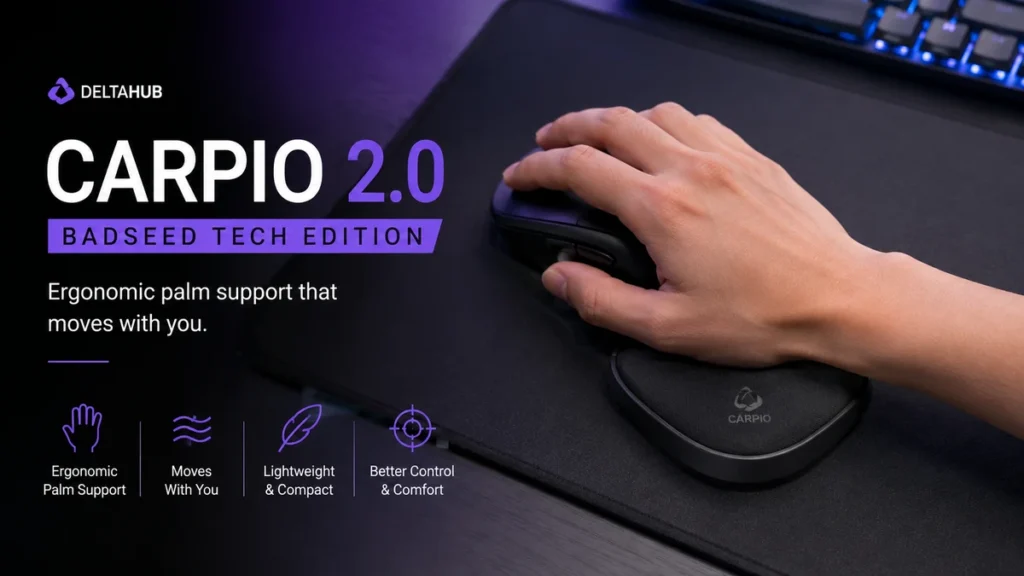
That is where badseed tech carpio enters the conversation. The name is associated with a special BadSeed Tech edition of DELTAHUB’s Carpio 2.0, a compact ergonomic wrist rest designed to move with the hand rather than remain fixed beside the mouse. DELTAHUB says the product was developed through medical-expert collaboration, prototypes, hand scans, comparative MRI examinations, and feedback from more than 20,000 users.
Quick answer: The badseed tech carpio is essentially a special-edition Carpio 2.0 created around the same mobile wrist-support concept as DELTAHUB’s standard model. It sits beneath the lower palm, glides across the desk with your hand, and aims to distribute pressure while preserving normal mouse movement rather than anchoring your wrist to one spot.
What Is the Badseed Tech Carpio?
The badseed tech carpio is a BadSeed Tech-themed version of the Carpio 2.0 ergonomic wrist rest from DELTAHUB. It should not be confused with an entirely separate wrist-rest platform or with the newer BadSeed Tech gaming-mouse collaborations sold by Pulsar.
That distinction matters because search results around BadSeed Tech now include several different peripheral collaborations. BadSeed Tech has worked within the gaming and PC-accessory space, while Pulsar currently sells BadSeed Tech Edition X2H CrazyLight gaming mice.
The Carpio product, however, comes from DELTAHUB.
Instead of placing a stationary cushion in front of the mouse, Carpio takes a more unusual approach. The support sits beneath the palm and moves with the user’s hand.
This changes the basic relationship between your hand and a wrist rest.
With a conventional pad:
- The wrist support stays still.
- Your hand moves away from it during larger mouse movements.
- You may repeatedly slide across the cushion.
- The wrist can become a pivot point.
With Carpio:
- The support travels with your hand.
- The palm remains supported during many mouse movements.
- The wrist itself does not have to rest directly against a stationary pad.
- The device can follow movements across the desk or mousepad.
The concept is simple, but it explains why Carpio feels quite different from a foam or gel wrist rest.
Why BadSeed Tech Became Associated With Carpio
BadSeed Tech is a technology creator known particularly for coverage of PC hardware, keyboards, mice, audio equipment, and gaming peripherals. The official BadSeed Tech site continues to publish and showcase hardware-focused video content.
The relationship with Carpio goes beyond someone simply mentioning the product.
On DELTAHUB’s official BadSeed Tech Edition page, Brian from BadSeed Tech describes noticing Carpio devices while touring the Linus Tech Tips studios and deciding to try one himself. DELTAHUB subsequently offered the Carpio 2.0 BadSeed Tech Limited Edition.
This is why phrases such as “BadSeed Tech Carpio” appear online.
The most accurate way to understand the name is:
DELTAHUB makes Carpio; BadSeed Tech is associated with a special collaborative edition of Carpio 2.0.
That is more precise than treating “BadSeed Tech Carpio” as an independent product manufacturer or a completely different ergonomic device.
How the Badseed Tech Carpio Works
Carpio’s main idea is dynamic support.
Traditional wrist rests normally create a fixed elevated surface. Carpio instead becomes a small platform beneath the hand, allowing the support itself to travel while you operate a mouse.
Support Is Placed Under the Palm
A crucial detail is where the device sits.
Despite commonly being called a wrist rest, the goal is not simply to place a hard object directly underneath the center of the wrist. The Carpio supports the lower portion of the hand so that pressure can be distributed differently while the wrist retains room to move.
Proper positioning matters.
If the device sits too far toward the fingers, it can interfere with grip. If it sits too far back, you may not get the intended support and movement.
Expect a short adjustment period while finding a natural position.
It Moves With Your Hand
Movement is what separates Carpio from most desk wrist supports.
Its low-friction contact surfaces allow it to glide as the mouse hand travels around the working area. That means support does not immediately disappear when you make a larger mouse movement.
For people who use relatively broad mouse movements, this can feel more natural than repeatedly moving on and off a fixed cushion.
It Does Not Control the Mouse
Carpio remains separate from the mouse.
You still grip and control your mouse normally. The device simply sits underneath the hand as an additional support surface.
That makes it compatible in principle with many different mouse shapes because it does not attach directly to the mouse body.
Badseed Tech Carpio vs a Traditional Wrist Rest
The biggest difference is not material or appearance. It is movement.
| Feature | Badseed Tech Carpio | Traditional Wrist Rest |
|---|---|---|
| Position | Under lower palm/hand | Usually behind mouse or keyboard |
| Movement | Moves with the hand | Remains stationary |
| Mouse freedom | Designed to follow movement | Hand can move away from support |
| Desk footprint | Compact | Often wider |
| Adjustment period | Usually required | Usually familiar immediately |
| Portability | Easy to carry | Depends on size |
| Support style | Dynamic | Static |
Neither approach is automatically better for every person.
A conventional wrist rest has the advantage of simplicity. Put it on the desk and most users immediately understand how it works.
Carpio asks you to change an established habit.
That can be worthwhile for someone who dislikes stationary wrist pads, but a person who barely moves their mouse or already has a comfortable neutral setup may find the difference less dramatic.
Carpio 2.0 Design and Ergonomics
DELTAHUB says development of Carpio involved more than two years of work with medical experts, dozens of prototypes, 3D hand-mold scans and comparative MRI examinations. The company also says later development incorporated feedback from more than 20,000 users.
Those claims help explain several characteristics of the product.
Contoured Shape
Carpio is not shaped like a rectangular pad.
Its sculpted form is intended to interact with the lower palm while leaving room for natural hand positioning. This becomes particularly relevant during mouse use, where the fingers, palm and forearm continuously make small adjustments.
Low-Friction Movement
A moving wrist rest only works if it can travel smoothly.
Too much friction would make the user drag the device around, defeating much of the concept. The sliding design therefore plays an important role in the overall experience.
Your desk surface can affect how that movement feels.
A clean, smooth surface will behave differently from a rough desktop or heavily textured mousepad.
Compact Footprint
One practical advantage is size.
Large gel wrist rests occupy permanent desk space. Carpio only needs enough room to travel with the mouse hand.
This can make it appealing for minimalist desk setups, laptop workstations and users who frequently move between different desks.
Does the Badseed Tech Carpio Help With Wrist Comfort?
It can improve comfort for some users, but expectations need to remain realistic.
Ergonomic accessories work within a larger system. Your chair height, desk height, monitor position, forearm support, mouse grip, mouse sensitivity, working hours and movement habits all influence how your hand and wrist feel.
Carpio changes one part of that system: how the hand is supported while using the mouse.
Its moving design may be useful if you dislike:
- pressing the wrist against a hard desk edge;
- repeatedly sliding on and off a fixed wrist pad;
- keeping the wrist planted while moving the mouse;
- bulky gel rests;
- unsupported mouse use during long desk sessions.
What it cannot do is automatically correct every ergonomic issue.
If your desk is much too high, for example, adding a palm support does not fix the shoulder and forearm position created by the desk height.
Likewise, no wrist accessory should be presented as a guaranteed treatment for carpal tunnel syndrome, repetitive strain injury, or another medical condition. Persistent pain, numbness, tingling, weakness, or loss of hand function deserves professional medical assessment rather than self-diagnosis through a desk accessory.
Who May Benefit Most From the Badseed Tech Carpio?
The product makes the most sense for people who spend substantial time controlling a mouse.
Gamers
Gaming involves frequent mouse movement, particularly in FPS titles where players may use lower sensitivity and larger arm movements.
A mobile support has an obvious conceptual advantage here: it can follow the hand instead of forcing the player to remain close to one stationary wrist pad.
However, competitive players should allow time to adapt before judging it.
Changing the contact points underneath your hand can initially affect how mouse movement feels.
Designers and Creative Professionals
Graphic designers, video editors, photographers, CAD users and other creative professionals often make thousands of small cursor adjustments during a workday.
For these users, comfort over several hours can matter more than an immediate dramatic effect.
Programmers and Office Workers
Not every Carpio user is a gamer.
Spreadsheet work, web browsing, coding, research and general office tasks can involve hours of repeated mouse input. A compact mobile wrist support may fit naturally into these setups.
Laptop Users
Because Carpio is relatively compact, it is easier to move between workstations than a full-width wrist cushion.
That portability is useful for people who work from an office, home, coworking space or laptop setup.
How to Use the Badseed Tech Carpio Correctly
A good ergonomic product can feel bad when positioned incorrectly.
Rather than immediately deciding whether Carpio works for you, spend some time experimenting with placement.
1. Place It Beneath the Lower Palm
Start with the Carpio underneath the lower portion of your mouse hand rather than directly pressing it into the center of the wrist.
Your fingers should still reach the mouse naturally.
2. Keep the Forearm Relaxed
Avoid intentionally pushing downward onto the support.
The goal is comfortable support, not transferring as much body weight as possible into the device.
3. Move Normally
Do not consciously drag Carpio.
Move the mouse as you normally would and allow the wrist support to travel with your hand.
If you constantly feel that you are fighting the device, check its position and the surface underneath it.
4. Adjust Your Desk Setup
Your elbow, forearm and desk height still matter.
Try to keep the shoulder relaxed and avoid reaching upward toward an excessively high desk.
5. Give Yourself Time to Adapt
A moving wrist support is unfamiliar.
Your first ten minutes with it may not represent how it feels after several days of regular use.
That adjustment period is one of the most overlooked parts of evaluating the Carpio.
Common Mistakes When Using Carpio
Most problems come from treating it exactly like a traditional wrist rest.
Putting it directly under the wrist: The design is better understood as lower-palm support rather than a cushion that you press the wrist into.
Applying too much pressure: More pressure does not equal more ergonomic support.
Expecting instant familiarity: Because Carpio moves, it changes the physical feedback underneath the mouse hand.
Ignoring mouse sensitivity: Extremely large or rapid movements can create a different experience from high-sensitivity office mouse use.
Ignoring the rest of the workstation: A wrist accessory cannot compensate for every problem created by poor chair, desk, keyboard or monitor positioning.
Expecting medical treatment: Comfort-oriented ergonomic equipment and medical treatment are not interchangeable.
BadSeed Tech Edition vs Standard Carpio 2.0
This is probably the most important buying-related question around the keyword.
The BadSeed Tech version is based on the same core Carpio 2.0 platform rather than representing a fundamentally different ergonomic mechanism. A recent comparison of the two likewise identifies the BadSeed Tech model as a special colorway/collaboration built around the standard Carpio 2.0 design.
So the decision should not be framed as:
“Which one has the better ergonomic technology?”
A more useful question is:
“Do I prefer the BadSeed Tech edition enough to choose it over the standard version?”
For most users, fit and comfort should matter more than the collaboration branding.
If two editions use the same underlying ergonomic design, paying attention to the correct size and how the device fits your hand is more useful than choosing solely by appearance.
Is Carpio Only for Gaming?
No.
The connection with BadSeed Tech naturally gives the product a strong gaming-peripheral identity, but the underlying problem it addresses is much broader.
Mouse-intensive computer use happens in:
- software development;
- video editing;
- graphic design;
- 3D modeling;
- office administration;
- financial analysis;
- engineering;
- content creation;
- gaming;
- everyday browsing.
This makes Carpio more accurately described as an ergonomic computer accessory than a gaming-only accessory.
Gaming is simply one environment where continuous mouse movement makes its dynamic design particularly relevant.
Does Carpio Work With Every Mouse?
Because Carpio is not attached to the mouse, it is not restricted to one particular mouse model.
Still, the overall experience depends on the complete setup.
Mouse shape influences palm position. Grip style changes how much of the hand contacts the mouse. Sensitivity determines how far the hand travels. Desk and mousepad surfaces affect how easily the support moves.
Someone using a small mouse with a fingertip grip may therefore experience Carpio differently from a relaxed-claw user with a larger mouse.
There is no universal setup that guarantees the same feel for everyone.
Advantages and Limitations
A balanced evaluation needs both.
Main Advantages
Dynamic support: Carpio moves with the mouse hand rather than forcing the hand to return to a fixed support point.
Compact design: It occupies little permanent desk space.
Portability: The small form makes it practical for people working from multiple locations.
Distinct ergonomic concept: It provides an alternative for people who dislike conventional foam and gel wrist rests.
Broad use cases: Gaming, editing, coding and office work can all involve the kind of repetitive mouse use Carpio is designed around.
Potential Limitations
Adjustment takes time: The moving sensation may initially feel strange.
Fit matters: Hand size and positioning influence comfort.
Surface matters: Sliding performance can vary with the desk or mousepad.
It changes mouse feel: Competitive gamers may notice the additional contact beneath their hand.
It solves only one part of workstation ergonomics: Chair, desk, mouse, posture and work habits remain important.
It is not medical treatment: Users should avoid treating ergonomic marketing as a diagnosis or cure.
Carpio and Modern Lightweight Gaming Setups
The wider peripheral market has increasingly emphasized low weight and reduced resistance.
BadSeed Tech’s more recent collaboration with Pulsar illustrates that trend clearly. Pulsar’s BadSeed Tech Edition X2H CrazyLight Medium gaming mouse is listed at roughly 43 grams with dot skates and features an XS-1 sensor, up to 32,000 DPI and polling rates up to 8,000 Hz.
That does not mean those mouse specifications are part of Carpio.
They are separate products.
But they illustrate why a mobile wrist-support concept fits naturally within enthusiast desk setups: modern peripherals increasingly focus on minimizing resistance and allowing precise movement.
The important practical point is that adding any support underneath your hand changes tactile feedback. Gamers who carefully tune mouse weight, skates, grip and sensitivity should test Carpio as part of the entire setup rather than evaluating it in isolation.
How to Decide Whether the Badseed Tech Carpio Is Right for You
Start with your actual problem.
If your main complaint is that traditional wrist rests restrict mouse movement or that your palm repeatedly loses support during larger movements, Carpio’s dynamic design directly addresses that issue.
If your problem comes primarily from a desk that is too high, a chair with poor adjustment or excessively long sessions without breaks, the device addresses only a small part of the situation.
A useful decision process is:
- Identify when discomfort occurs.
- Check basic chair and desk positioning.
- Observe where your palm and wrist contact the desk.
- Consider whether a stationary wrist rest restricts your movement.
- Choose the appropriate Carpio size or edition.
- Test different placement positions.
- Allow an adaptation period.
- Reassess your complete workstation rather than judging one accessory alone.
That approach gives you a much better idea of whether the product genuinely improves your setup.
Final Thoughts on Badseed Tech Carpio
The badseed tech carpio is best understood as a special BadSeed Tech edition of DELTAHUB’s Carpio 2.0 rather than an unrelated product carrying a similar name. Its defining feature is dynamic lower-palm support: instead of remaining stationary, the device is designed to glide with your mouse hand.
That simple difference makes it an interesting alternative to conventional foam and gel wrist rests, particularly for gamers, programmers, designers, editors and other people who spend hours using a mouse.
Its strongest qualities are mobility, compactness and an unusual approach to hand support. Its biggest limitations are equally straightforward: fit is personal, adaptation takes time, and no wrist rest can fix an otherwise poorly arranged workstation.
For anyone researching the BadSeed Tech collaboration, the key point is therefore not whether it offers some mysterious technology unavailable elsewhere. The more useful question is whether Carpio’s moving-support design fits the way you actually use your mouse. If it does, the concept can make considerably more sense than a stationary wrist pad.